We've partnered with Patchstack to launch Patch & Protect

Today, we’re introducing a new step forward in how Modular DS helps you manage and secure your WordPress websites.
We’ve partnered with Patchstack, the leading WordPress threat intelligence company, to bring advanced security right into your dashboard, giving you stronger protection for your sites without extra tools or complex setups.
Here’s what this partnership means for you.
Table of contents
Early vulnerability detection
Thanks to this collaboration, Modular DS now has access to Patchstack’s vulnerability database, the largest in the WordPress ecosystem.
This means you’ll see plugin, theme, and WordPress vulnerability warnings in Modular DS up to 48 hours before they’re publicly disclosed, allowing you to get critical information sooner.
And that’s just the beginning.
Meet Patch & Protect
Alongside this integration, we’re introducing Patch & Protect, a new add-on that gives your websites an extra layer of protection in two ways: mitigation and hardening rules.
Virtual patching for mitigation
Did you know that hackers often target vulnerabilities within hours of disclosure?
Patch & Protect helps keep your websites secure by blocking vulnerabilities in plugins, themes, and WordPress core as soon as they’re detected, even before an official update is released.
Through virtual patching (targeted mitigation rules), it prevents exploits from being executed, protecting your sites instantly without modifying any code.
Hardening features
Beyond virtual patching, Patch & Protect strengthens your sites’ security with a set of hardening rules specifically for WordPress, such as:
-
- Hiding information about your WordPress version.
- Disabling the theme editor and user enumeration.
- Restricting XML-RPC access.
- Adding security headers to prevent attacks such as XSS or clickjacking.
- Blocking access to the WordPress debug.log file, among others.
These measures make it harder for bots and attackers to access sensitive information, inject malicious code, or exploit weak spots that often put WordPress sites at risk.
Patch & Protect is lightweight by design. It runs at the PHP level and only applies rules when necessary, having no impact on site performance.
Why does this all matter?
You know that security goes hand in hand with WordPress maintenance. Being proactive and preventing issues before they happen is just as important as keeping your sites updated and optimized.
This integration with Patchstack makes it a lot easier:
- Your managed websites stay protected at all times.
- You save time (and stress) by reducing the chance of emergency fixes.
- You keep everything centralized and automated from one dashboard.
In other words, you gain time, control, and most importantly, peace of mind, without changing the way you already work in Modular DS.
Activate Patch & Protect today
Patch & Protect is available on all PRO plans for $2.25/month per site.
You can activate it directly from your Modular DS dashboard.
Check out this article in our knowledge base for details.
Got more questions? We have answers
Can I see which threats have been blocked in Modular DS?
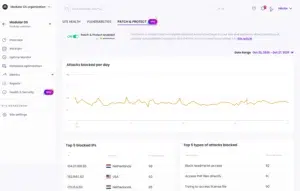
Yes. You can view blocked threats in the Health and Security section of each site.
There you’ll find a Patch & Protect tab with more information, such as the number of blocked attacks by date range, their type, or IP origin, which you can also add to your client reports.
Do I need the Patch & Protect add-on if I use a malware scanner and/or firewall tool?
A firewall and a server-side malware scanner can be useful as part of a layered security strategy, but they have limitations, and neither can precisely protect your sites against vulnerabilities.
Patch & Protect adds immediate mitigation at the application layer (where most preventable hacks happen), preventing vulnerabilities in your WordPress plugins and themes from being exploited.
Is Patch & Protect compatible with other security plugins and tools?
Yes, it is. To best protect your WordPress sites, using a layered security approach is always recommended, with dedicated solutions for the network, server, and application layers.
My websites are small and low-traffic, are they still at risk of being hacked?
Yes. Most attacks are automated and don’t target specific websites.
Hackers use bots that constantly scan for known vulnerabilities in plugins and themes, but also for common misconfigurations that can expose your site. If yours happens to use a third-party vulnerable component or has one small gap, it can still be targeted.

Stay in the loop